Cuckoo

2022 – 2023 / Based in Finland

I worked as a UX/UI Designer at Cuckoo, collaborating with product and engineering to improve the usability and clarity of the workplace wellbeing app.

We ran recurring user feedback sessions that informed prioritization and surfaced opportunities around navigation, information hierarchy, and goal-setting.

Our work made it easier for users to understand their progress, access wellbeing content, and get more value from the product.


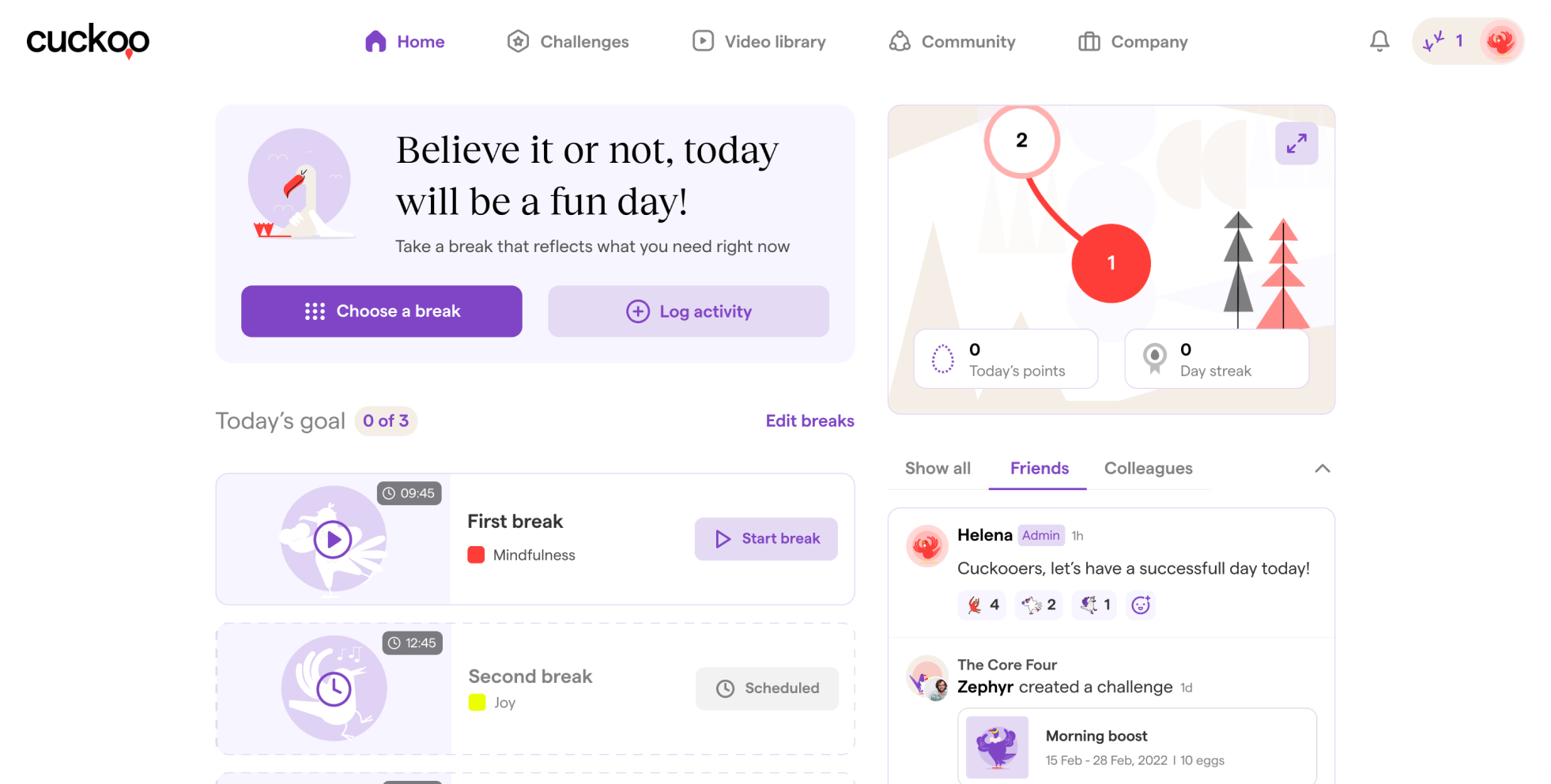
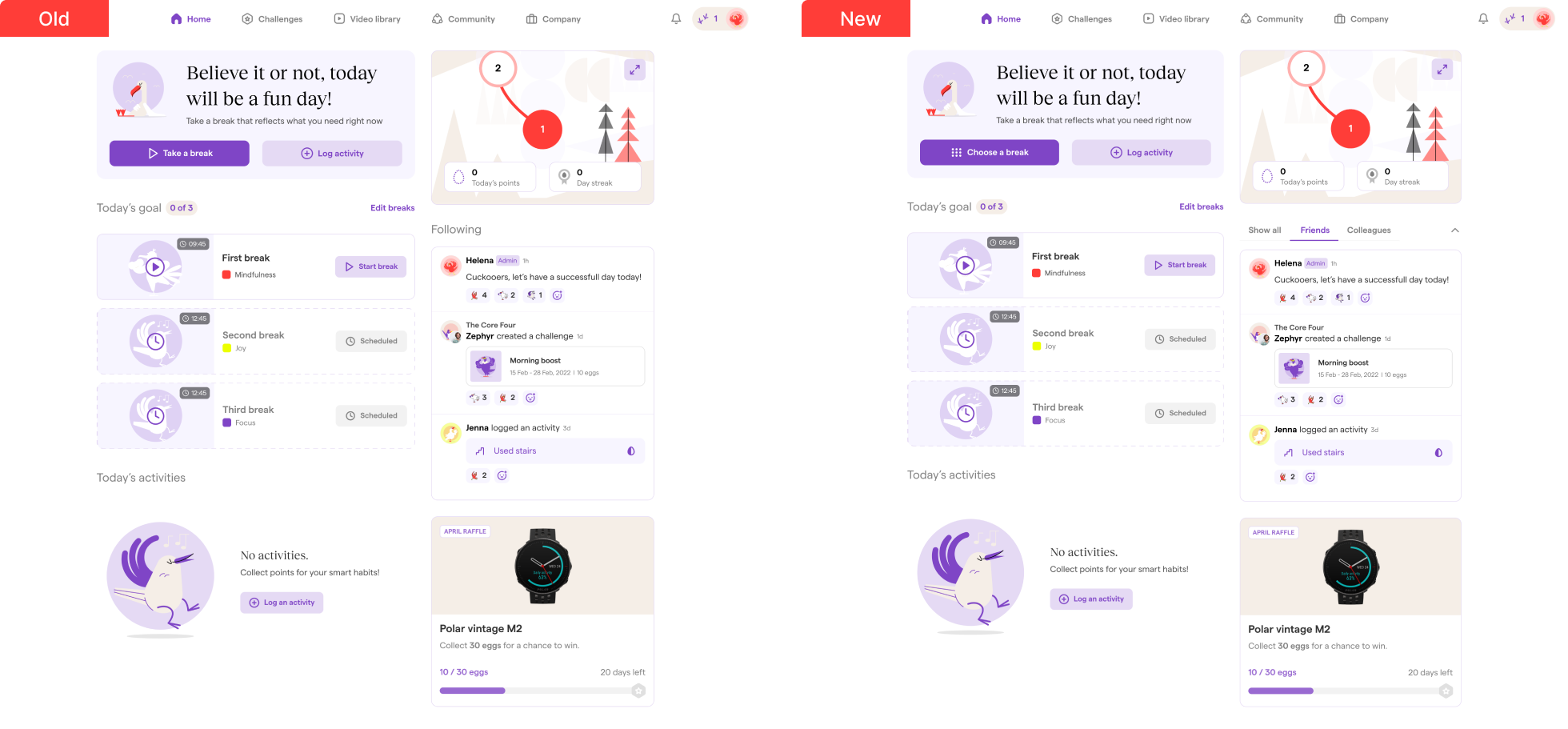
Homepage action label fix

Feedback showed that users struggled to locate break actions from the homepage — the labels “Take a break” and “Start break” were ambiguous and used the same icon, causing confusion.

We updated the label to “Choose a break” and introduced a clearer icon to differentiate selecting vs starting a break.

Result: Qualitative feedback became noticeably more positive, and users were able to initiate breaks directly from the homepage without navigating to the video library.

Improving video library filtering & browsing

Users struggled to browse videos efficiently due to redundant filters, visual noise, and unclear tag selections.

Key issues identified:
- Two of three filters contained overlapping options
- All thumbnails used a “play” icon (redundant for a video-only environment)
- Selected tags were hidden after confirmation → forcing users to reopen filters to see or remove them

Design decisions:
- Removed redundant filter and kept Tags + Categories
-
Removed play icon to reduce visual noise and increase scanability
- Replaced hidden selected tags with visible chips that can be removed inline

Outcome:
These changes increased clarity and lowered interaction cost. Users could filter videos faster and manage tags without reopening menus, making browsing smoother and visually cleaner.

Improving video discovery & personalization

Identified gaps:
- No way to save favorite videos
-
Users had difficulty finding relevant videos quickly
-
No personalized discovery or history context

Design solutions:
- Added Favorites with dedicated “My favorites” entry point
- Added 3 personalized sections to improve browsing:
          - Previously watched
         -  Most viewed
        - Recommended for you

Rationale:
These additions reduce navigation effort and help users go straight to the content that matters to them.

Users can now:
✔ Save videos
✔ Quickly rewatch familiar content
✔ Discover new videos without filtering

Clarifying completed vs. Ongoing challenges

I redesigned the way completed challenges are displayed on our platform. I did this in response to feedback from users who said they had difficulty distinguishing between ongoing and completed challenges. One of the changes I made was to add a purple tick mark with a circle background to the top right of the avatar for completed challenges. I did not center the tick mark on the challenge image because sometimes challenges have sponsors and we use their logos as the challenge image. I wanted to avoid obscuring the sponsor logo with the tick mark.

Problem:
Users reported difficulty distinguishing ongoing challenges from completed ones in the leaderboard view.

This caused:
- Confusion about state (“am I done?”)
- Reduced motivation to join new challenges
- Unnecessary navigation into detail pages

Constraints:
- Challenge avatars sometimes include sponsor logos → cannot obscure them
- Visual complexity must remain minimal (40+ working personas)

Solution:
We introduced a discreet completion badge located outside the avatar, using a circular background to improve visibility without covering sponsor logos.

Result:
Users were able to quickly scan and understand state without opening detail views, reducing cognitive load during browsing.

Expanding challenge types to increase engagement

Problem:

User interviews revealed two behaviors:
- Some users prefer self-paced personal goals
- Others are motivated by social competition
- Creating challenges required too much coordination effort

This limited retention and peer engagement.

Solution:
We expanded the challenge system with two new formats:

- Most Points: Competitive, ends when time expires → ideal for high-competition personalities.
- Set a Goal: Self-paced, ends when user reaches a personal target → ideal for autonomy-driven users.
- Quick Challenge: One-tap challenge via user profile → removes the friction of setting up a group.

We believe that these new challenges will make our platform more engaging and fun for users. They provide users with more flexibility and control over their challenges, and they make it easier for users to challenge their friends.

These formats map to different motivation types:
- Achievement
- Competitiveness
- Autonomy
- Relatedness

Allowing the platform to appeal to a wider behavioral spectrum.

Expected Outcomes:
- More challenges being created
- More friend-to-friend interactions
- Reduced drop-off from coordination friction
- Higher feature stickiness

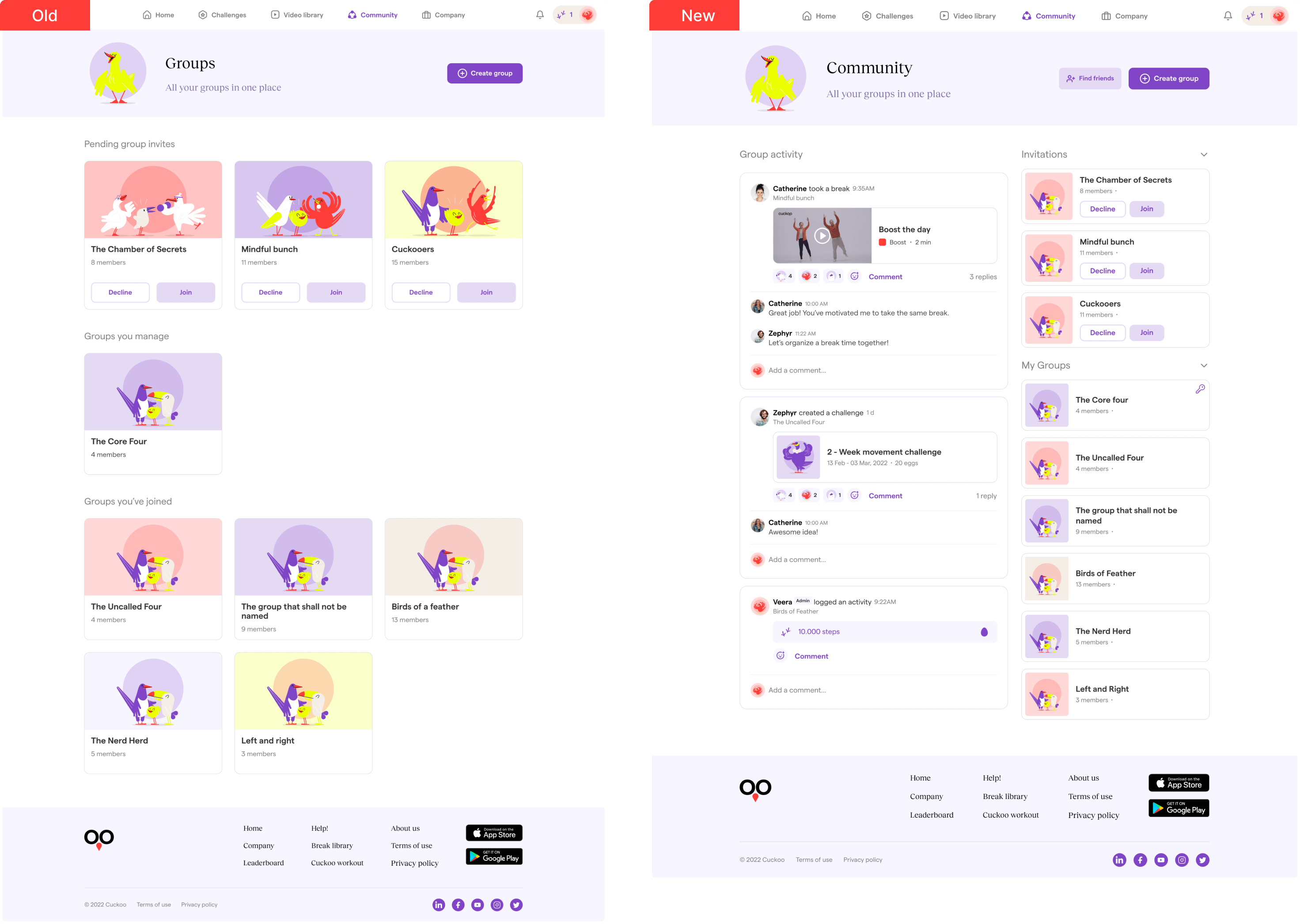
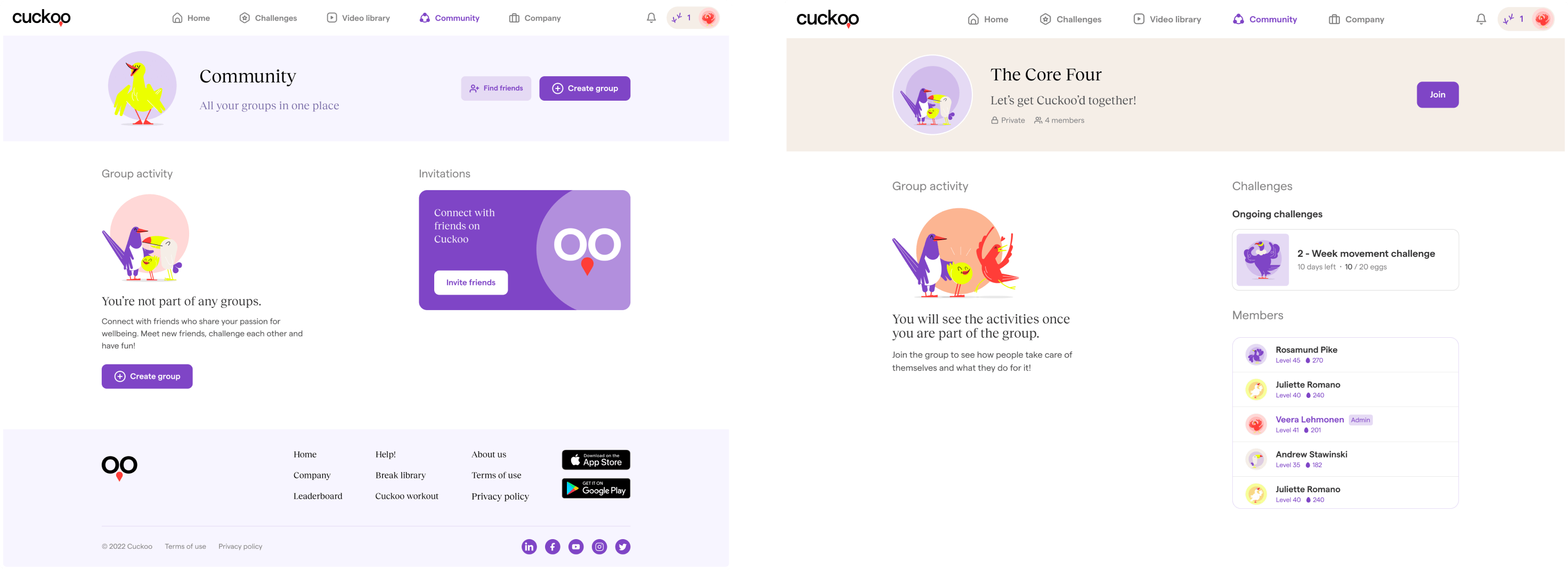
Community: Increasing social visibility & participation

Problem:
Users struggled to follow group activities because participation was hidden inside each group page. Engagement was fragmented, and users had no single place to understand “what’s happening right now.”

This led to:
- Low visibility of group interactions
- Fewer spontaneous contributions
- Increased effort to stay informed

Research Insight:
Users didn’t think in terms of groups, they thought in terms of activity.
They expressed desire to:
“see what others are doing without opening every group”

Strategy:
We centralized community activity into a single feed to make participation visible by default and reduce navigation effort.

Solution:
We redesigned the Community page to include:
- Unified activity feed: Surface all events (posts, breaks, challenges) across groups in one place.
- Context labels: Each activity displays the originating group to preserve context.
- Collapsible lateral sections: “Invitations” and “My groups” remain accessible without competing with activity.
- Role distinction indicators: A key icon differentiates groups the user manages vs participates in.

Outcome:
Users can now understand community dynamics at a glance and participate more organically without searching or navigating through multiple layers.

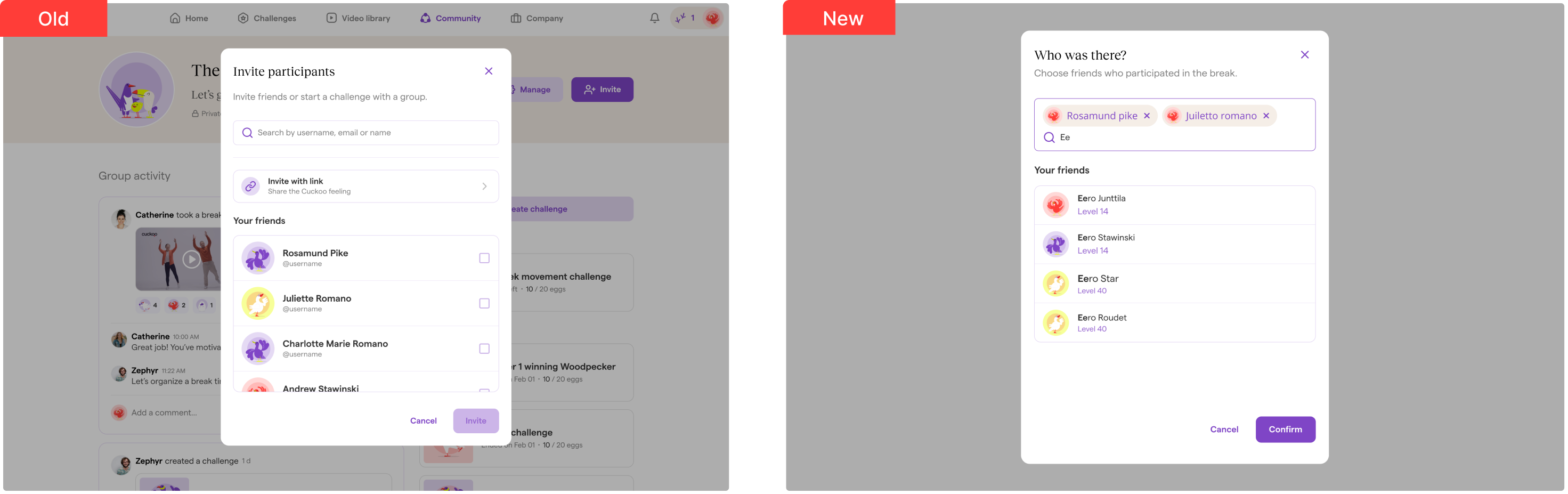
Invite participants: reducing memory load & improving selection clarity

Problem:
In the old “Invite participants” modal, users could only select friends through a long checkbox list. Selections were not visible outside the scroll area, which forced users to mentally track who had already been added. This increased memory load and led to uncertainty and selection errors.

Strategy:
To reduce cognitive effort, I switched to a chip-based selection pattern already used in the Video Library filters. This makes the selection state externally visible rather than internally memorized.

Solution improvements:
- Visible selection chips show all added participants at once
- One-tap removal reduces friction when editingInline search supports faster filtering in large lists
- Consistent component pattern creates familiarity across the product

Outcome:
Users can now add or remove participants with much higher confidence. They no longer need to remember who they've selected, and the interaction feels faster and cleaner.